

Active installs
2K+
Product comparison
Subscription includes
Support
Force Sells for WooCommerce ensures required items, services, or fees are added with the main product automatically. That means fewer missed parts, fewer confused customers, and cleaner orders. Use it when certain items aren’t optional, when compliance requires an add‑on, or when you want to remove decision friction at the cart.
Customers often overlook essentials and support teams chase corrections later. Force Sells prevents lost revenue, avoids re‑shipping missing parts, and keeps checkout simple. Shoppers get everything they need in one step, and your operations stay tidy.

Force Sells is designed for merchants who need certain products and services purchased together every time. It’s ideal when items can’t stand alone, when bundling protects margins, or when you want to remove guesswork for customers. Here’s a list of examples:
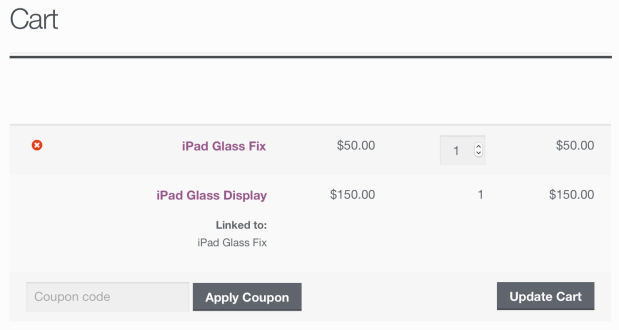
In the cart, synced items are clearly marked as “linked,” so customers understand why those items move together. This clarity reduces confusion and follow‑up support.
Choose Force Sells when the extra item is required every time. If you want to offer optional add‑ons or flexible bundles, consider Grouped Products or Product Bundles instead. For a deeper comparison, see our guide to product grouping and bundling.
Made and supported by the team at:

Normal force sells are added with the main product but customers can adjust or remove them. Synced force sells are locked: quantity and removal are tied directly to the main product.
Force Sells is best when items must always be purchased together (e.g. a repair service plus a part). Bundles and groups give customers more choice in configuration.
No. If the main product is removed or its quantity changes, the synced product updates or disappears automatically.
Yes. You can link any WooCommerce product type including subscriptions, services, digital products, or physical goods. Frequently paired with Constellation by Kestrel to do all of the above!
Yes. Synced products are marked as “linked” so customers understand they’re part of the main purchase.
Categories
Extension information
Quality Checks
Countries






