Product Icon

Elavon Converge Payment Gateway for WooCommerce

Take credit card payments with Elavon, the fourth largest merchant acquirer in North America.
Choose a billing option
$79
Save 20%
$158 $126.40

Subscription includes

  • Product updates and improvements
  • Customer support
  • 30-day money-back guarantee

  • Accept credit and debit card payments directly on your site
  • Accept eCheck / ACH transactions at checkout NEW
  • Display customizer authorization confirmation messages for eCheck transactions
  • Customers can securely save their payment method to their account for easier checkout NEW
  • Updated payment form at checkout with retina icons and inline validation NEW
  • Customers never leave your site during checkout
  • Show detailed decline messages at checkout instead of generic orders NEW
  • Full Support for WooCommerce Subscriptions NEW
  • Full Support for WooCommerce Pre-Orders NEW
  • Customers can add saved payment methods to their accounts without going through checkout NEW
  • Process refunds and voids automatically from within WooCommerce NEW
  • Capture prior authorized transactions right from the WooCommerce edit order screen NEW
  • Accepts all Major Credit Cards / Debit Cards – Visa®, MasterCard®, American Express®, Discover®, Diner’s Club, UnionPay, JCB
  • Supports Multi-Currency to allow transactions in multiple currencies or those different from your account currency NEW

Secure Payment and ACH Processing for WooCommerce with Elavon Converge

Accept credit card payments with Elavon, the fourth largest merchant acquirer in North America. Elavon Converge for WooCommerce is a gateway plugin that allows you to take credit card and eCheck payments directly on your WooCommerce store. Customers never leave your site during the checkout process, which results in a seamless checkout process. Includes full support for WooCommerce Subscriptions and WooCommerce Pre-Orders!

Rewritten for version 2.0 to add lots of great payment processing tools!

An SSL certificate is required for PCI compliance due to the direct checkout to ensure that your customers’ payment information is secure. The direct checkout allows you to keep the customer on your site for the entire process, allowing you greater control over the checkout experience so that you can test and implement the most effective experience for your store.

This Elavon Converge payment gateway connector lets you take advantage of several features offered by Elavon, such as refunds, card tokenization, and eCheck processing.
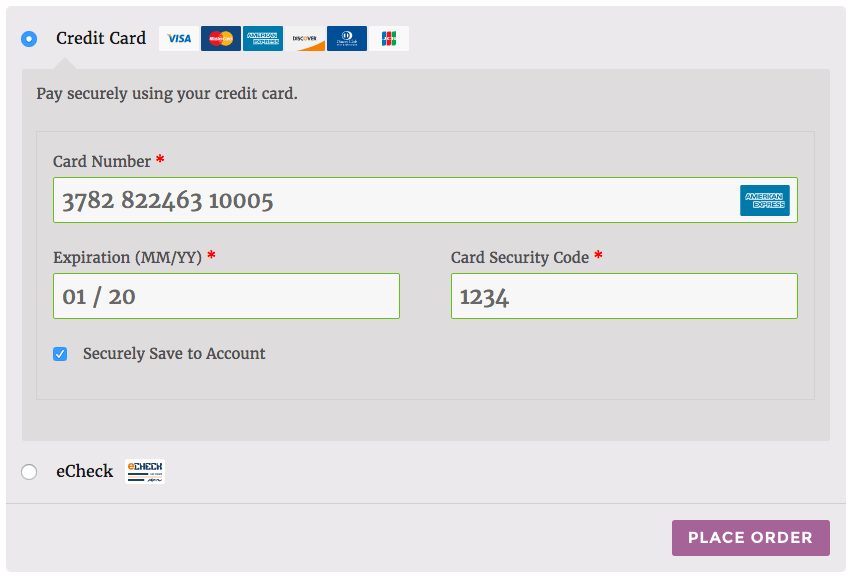
WooCommerce Elavon Converge Enhanced Checkout
Credit Card Checkout (Twenty Sixteen theme)

Simple, Seamless Checkout

Using the Elavon extension allows you to decide what your checkout process will look like, while keeping the customer on your site for the entire process. This gives you maximum control over this experience, providing a simple checkout process for the user and maximum customizability for the business owner.

WooCommerce Elavon saved card checkout
Using Saved Cards

You can now opt to show detailed decline messages to your customers, no more “an error occurred” error messages!

WooCommerce Elavon detailed decline messages
Detailed Decline Message

Support for Automatic Refunds & Voids – NEW

Shop employees can now process refunds for an order paid for with Elavon directly from within WooCommerce — no more logging into your merchant account to process refunds! Speed up your store management by creating full or partial refunds from the “Edit Order” screen and sending the transaction automatically to Elavon by clicking “Refund via Credit Card”.
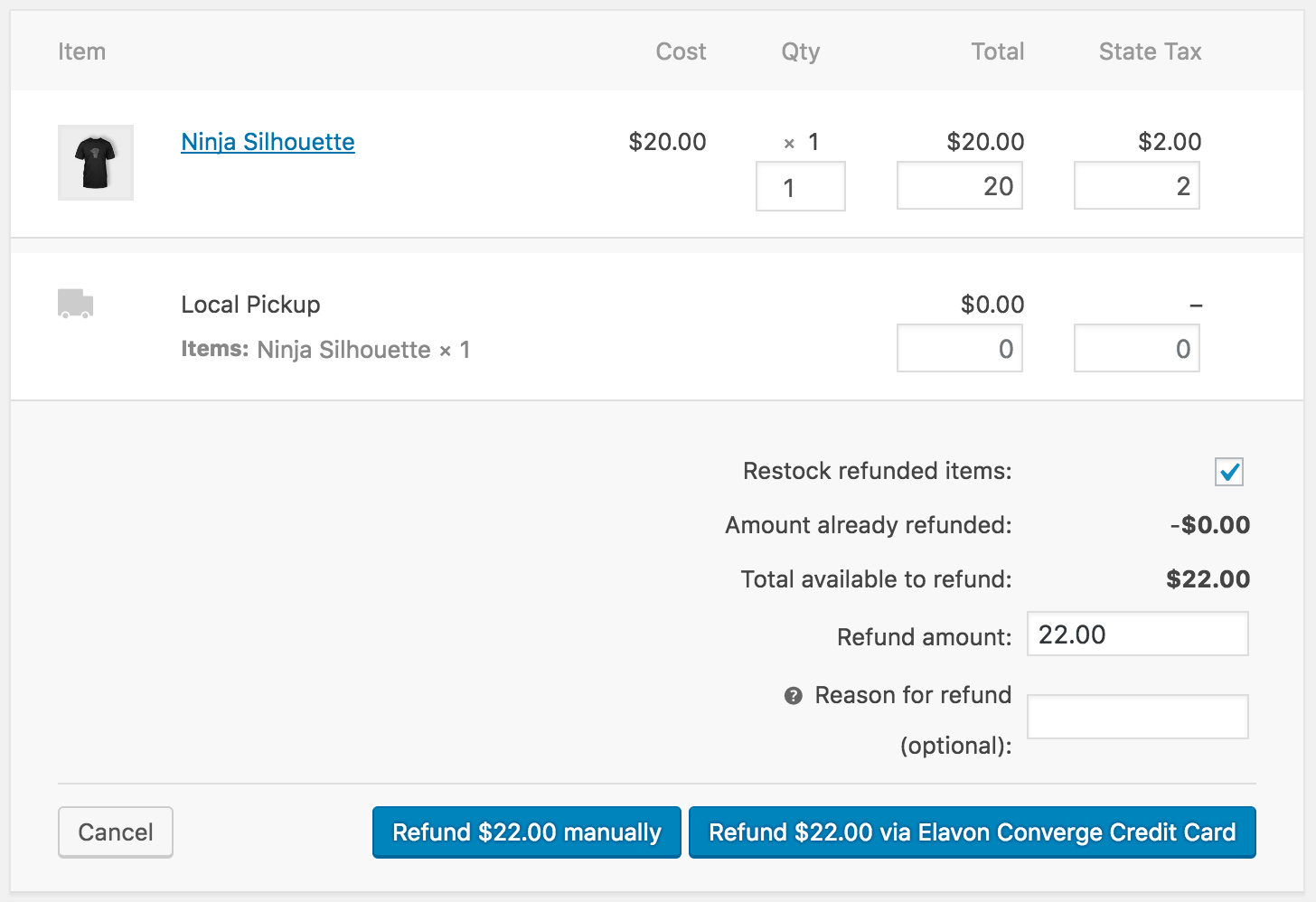
WooCommerce Elavon Converge Refund
Converge Refund

If the transaction has not been captured or settled, a transaction void will be performed automatically instead to cancel the order.

Securely Save Customer Payment Methods – NEW

Customers can easily & securely save multiple credit cards to their account for faster checkout, which are displayed in unified “My Payments” section of their account. Payment data is stored on Elavon’s secure servers, so your responsibility for PCI compliance is significantly reduced. There’s no limit to the number of credit cards a customer can store on their account.
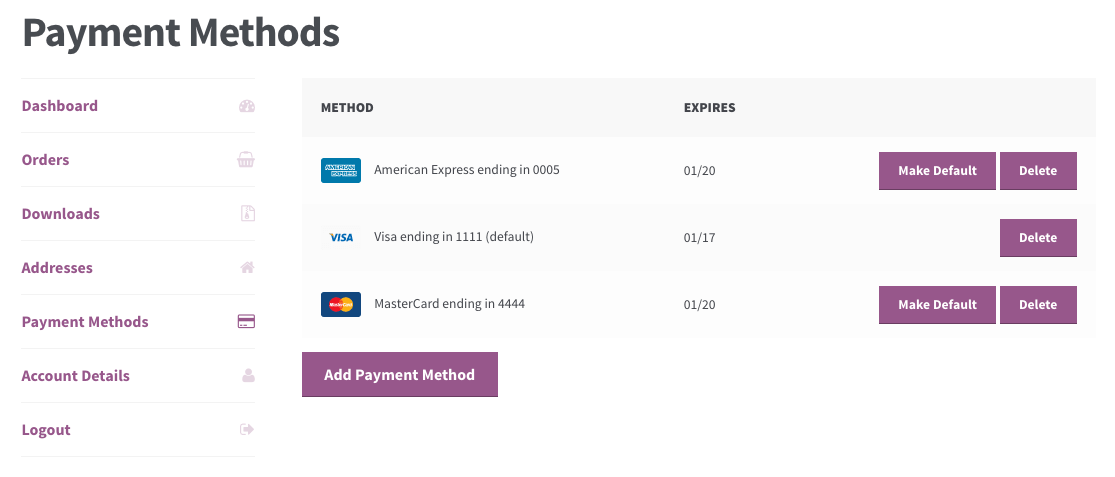
WooCommerce Elavon Converge Customer Saved Methods
Customer Saved Cards

Customers can also change their active payment method, add payment methods, and remove payment methods from the My Account page. The “Add Payment Method” workflow is seamless and tokenizes card information for future use without requiring the customer to go through checkout!

WooCommerce Elavon: Add payment
Customer Add Saved Payment

Full Support for Subscriptions and Pre-Orders – NEW

Elavon is an ideal gateway for WooCommerce Subscriptions, offering support for all of Subscriptions features – payment date changes, subscription date changes, and more. The gateway also fully-supports WooCommerce Pre-Orders, so you can take customer’s payment information upfront and then automatically charge their payment method once the pre-order is released.

Full Support for eChecks – NEW

Customers with bank accounts can checkout using their bank account information for a checking or savings account. This plugin will automatically display the required authorization messages for eCheck transactions at chekcout. To use this feature, you must have eChecks enabled for your account.
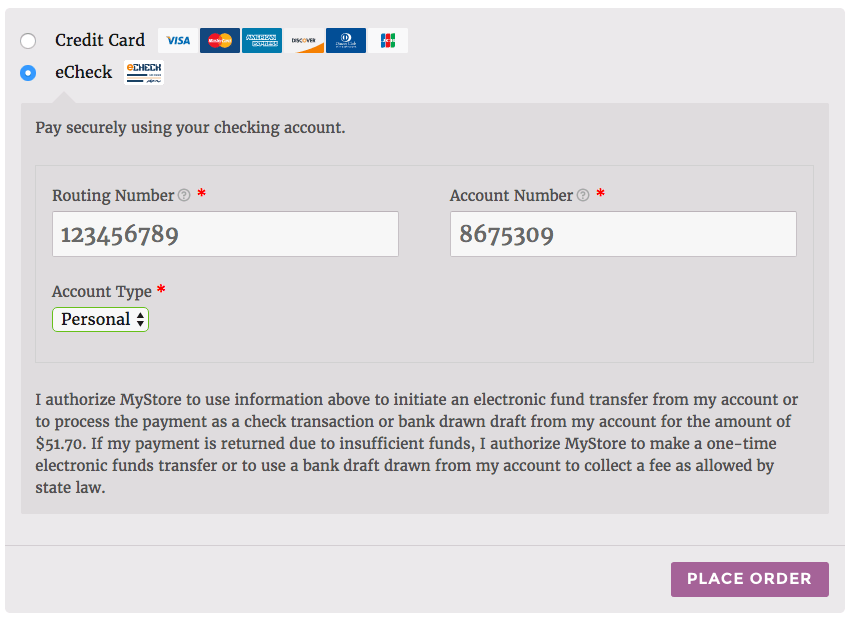
WooCommerce Elavon Converge eCheck Checkout
eCheck Checkout

Capture Charges directly from WooCommerce

Some users choose to set the payment gateway to only authorize charges rather than authorize & capture them. However, this requires the user to then log into the payment gateway admin to capture charges. Versions 2.0+ of this extension allow you to optionally capture previously authorized transactions directly from the WooCommerce Edit Order screen rather than logging into your Elavon control panel to do so. Simply edit the order, select the “Capture Charge” action, and charges will be captured through Elavon.
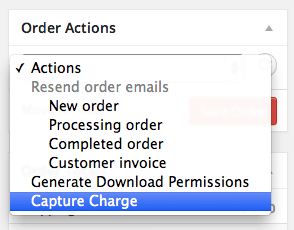
WooCommerce Elavon Payment Gateway Integration Capture Charge
Elavon Capture Charge

Multi-Currency Support – NEW

WooCommerce Elavon Converge supports Multi-Currency from Elavon to allow merchants to run transactions in a currency different from the account currency. This allows merchants to charge transactions in a currency different from the account currency, or to use a currency switcher (such as the Aelia Currency Switcher – purchase required) to let customers choose their currency to purchase.

How to Get Started

  1. Buy this extension 🙂
  2. Download and install into your WooCommerce store
  3. Login to your Elavon account (sign up for Elavon if you don’t already have an account) and grab your account credentials and PIN
  4. Save this information on the settings page
  5. That’s it! Sit back and enjoy secure payment processing!

Need any more reason to buy? When you purchase a SkyVerge-developed extension, you’re getting the highest quality extensions for your WooCommerce store. Gain peace of mind by knowing that when you purchase our products, your store’s performance is as important to us as it is to you.


Customer reviews

Average rating 3.0
59 reviews
5 stars, 36% of reviews
4 stars, 8% of reviews
3 stars, 10% of reviews
2 stars, 14% of reviews
1 star, 32% of reviews
59 reviews
  • infofluidconceptsnet
    Rated 5 out of 5
    Support
    Feb 24, 2026
    Support
    Setup wasn't as bad as others make it seem. Overall, the support has been great. The few issues we had over the years were quickly resolved by the team.
    • SkyVerge
      Feb 27, 2026
      Thank you for the 5 star review! We’re glad to hear setup went smoothly and that our support team has been able to resolve issues quickly over time. We really appreciate you taking the time to share your experience and your continued trust in the plugin. - S.M.
  • pacbiob54fda44f9
    Rated 3 out of 5
    Functionality
    Jan 27, 2026
    Functionality
    Evalon does not work the same way as Stripe. With Stripe a customer could not create a "Pending Payment" status. The credit card is entered on the main checkout page so they could not submit the order without entering a card. With Evalon, the user submits the order and then goes to a page to enter their credit card number. This is how their integration works. With Elavon, there are Pending Orders left in the cart - we are not sure if these pending orders are because the customers had issues but we did not have with Stripe - Zero. We will be installing a plugin that emails users to remind them they have not completed their checkout.
    • SkyVerge
      Feb 25, 2026
      Thank you for sharing this detailed comparison. Elavon’s Checkout.JS integration requires the WooCommerce order to be created before payment fields are loaded, which differs from Stripe’s inline card entry experience.

      Because of this, “Pending Payment” orders can occur if a customer doesn’t complete the second step. This is a limitation of the integration requirements rather than a bug, but we understand the operational difference compared to Stripe.

      We appreciate you sharing your experience, as it helps clarify expectations for other merchants considering the gateway. - S.M.
  • campbellhyde
    Rated 1 out of 5
    Functionality
    Jan 27, 2026
    Functionality
    Terrible does not work no support been trying for months!
    • SkyVerge
      Feb 25, 2026
      We’re sorry to hear this has been your experience. Elavon Converge requires a specific checkout flow due to how its secure payment integration works, and setup details can vary depending on configuration.

      If you’ve been working with support and things still aren’t resolved, please reply to your ticket and reference this review so we can escalate internally. - S.M.
  • rfce4you230394f5cb
    Rated 4 out of 5
    Ease of use
    Dec 23, 2025
    Ease of use
    There have been a few hiccups when payments to a company's bank account changes, but overall, Elavon has been good.
    • SkyVerge
      Dec 26, 2025
      Thanks for your review and thoughtful feedback. We understand the desire to streamline the checkout process and appreciate you sharing how it feels from the customer’s perspective.

      With Elavon Converge, an extra step is required so the order can be created before the secure payment fields are loaded. It isn’t always ideal, but it ensures the right data is passed securely. We’ll continue looking for ways to improve the experience going forward. Thanks again for the insight! - S.M.
  • info895c4c4fe4e
    Rated 3 out of 5
    Functionality
    Dec 18, 2025
    Functionality
    I just installed it and saw how a customer will checkout. I think the application could be improved by reducing the number of pages a customer has to click through to purchase. Right now a customer has to Add to Cart on a product, then Go to Cart, then Checkout to enter address, and finally can then click to another page to enter a credit card. This should be reduced by at least one page. Put the credit card number, exp., and CCV fields on the original Checkout page.
    • SkyVerge
      Dec 26, 2025
      Thanks for the thoughtful feedback. With the introduction of Checkout.JS in the Elavon Converge plugin, a one-page checkout isn’t currently possible due to technical requirements. Checkout.JS requires data from a WooCommerce order object (such as the order number), but WooCommerce doesn’t create the order until the initial checkout step is completed. For that reason, the plugin first creates the order, then moves the customer to the order-pay page where the payment fields are securely loaded. We know this isn’t an ideal user experience, and it’s something we’re actively keeping an eye on. That said, we felt this was a worthwhile trade off, as Checkout.JS provides a more secure and reliable p...

Extension information

  • WordPress version required: 5.2
  • WooCommerce version required: 3.6.0
  • PHP version required: 7.4
  • Tested with WordPress: 6.9
  • Tested with WooCommerce: 10.4.2
  • Requires at least WordPress: 5.6
  • Requires at least WooCommerce: 3.9.4

Compatibility

  • Cart & checkout blocks
  • High performance order storage (HPOS)

Countries

  • 🇨🇦 Canada
  • 🇺🇸 United States

Languages

English (United States)

Requirements

  • Elavon Converge was formerly known as Elavon VM (Virtual Merchant)
  • Elavon Converge is only available in the US and Canada
  • An SSL certificate is required to ensure your customer credit card details are safe

Related products

Price $29 annually
Rated 3.5 out of 5 stars
Price $109 annually
Rated 4.6 out of 5 stars
Free download
Rated 3.7 out of 5 stars
Price $139 annually
Rated 3.7 out of 5 stars
Price $79 annually
Rated 3.4 out of 5 stars
Price $59 annually
Rated 3.1 out of 5 stars
Price $49 annually
Rated 4.1 out of 5 stars
Price $109 annually
Rated 2.8 out of 5 stars
Price $109 annually
Rated 2 out of 5 stars