
Product Icon

Store Credit for WooCommerce

Store credit plugin for WooCommerce: sell gift cards, send credit for refunds, and let one balance carry across orders until it's spent.
Choose a billing option
$99
Save 20%
$198 $158.40

Product comparison

Subscription includes

  • Product updates and improvements
  • Customer support
  • 30-day money-back guarantee

Sell gift cards and give store credit that brings customers back

Store Credit for WooCommerce keeps the money in your store when a customer needs a refund, an apology or a gift. The credit sits on a store credit coupon tied to their email, and one balance carries from order to order until it’s spent or expires. You choose where credit applies, whether it covers shipping and when it expires. Customers see what they have at checkout and apply it with one click.

Sell gift cards customers can send to a friend

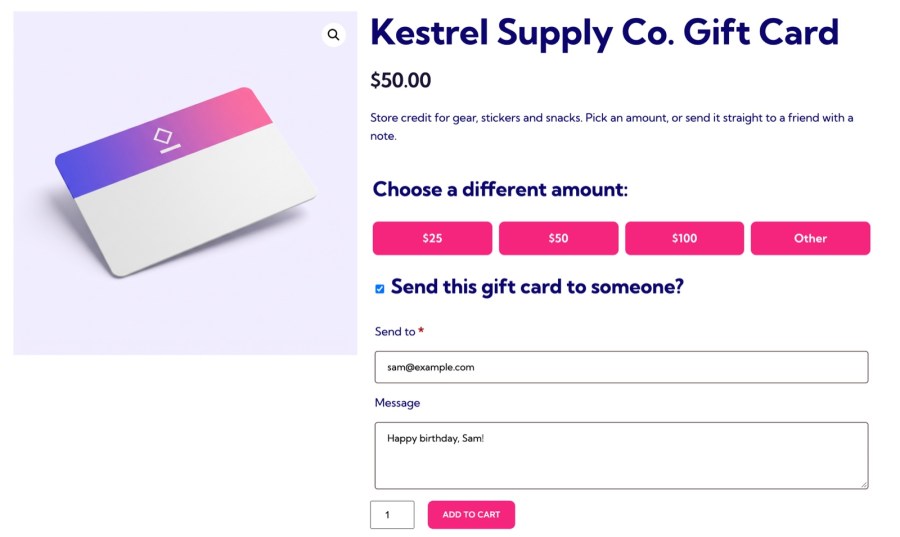
Add a Store credit product with preset amounts, or let customers choose their own between a minimum and maximum you set. A buyer can send the credit to someone else with a personal message, and the recipient gets a code by email, ready to spend. Credit is created when the order reaches Processing or Completed, and an order made up only of credit products completes as soon as it’s paid, so a gift card reaches its recipient without a manual step.
  • Offer preset amounts, a custom amount, or both on one gift card product
  • Give more than customers pay, such as $12 of credit for a $10 purchase
  • Let buyers send credit to another email address with a personal message
  • Format coupon codes with a prefix or suffix that matches your brand
WooCommerce gift card product with preset amounts and a send-to-a-friend form
Sell gift cards with preset amounts, sent straight to a friend

Turn a refund or an apology into a reason to come back

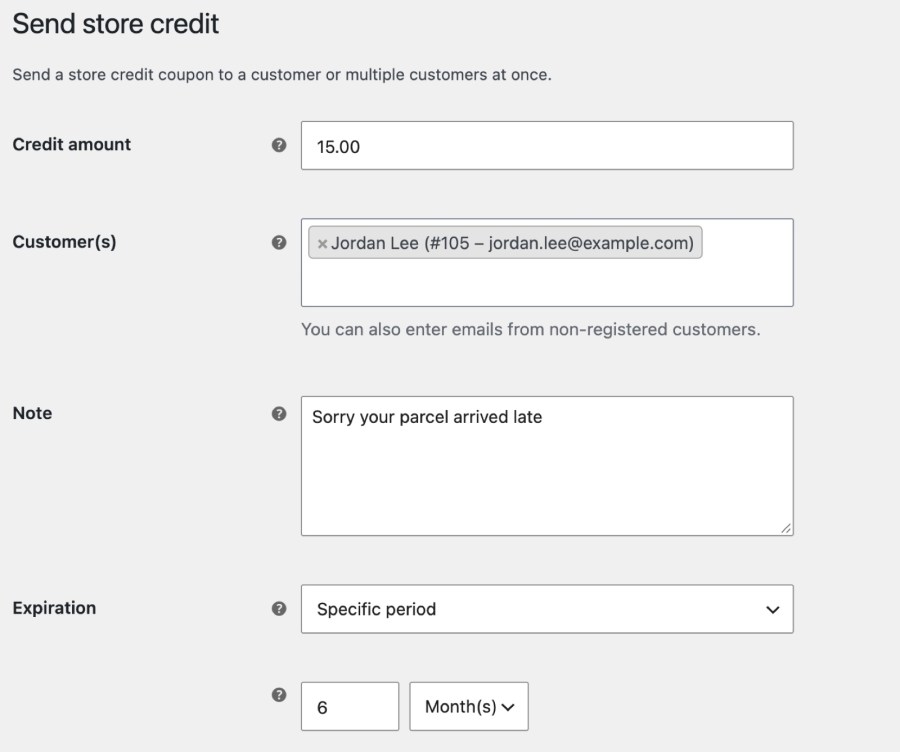
Open WooCommerce » Send store credit, choose a customer or type any email address for a shopper without an account, and add an amount, a note and an expiry. The customer receives an email with a Redeem now button that opens your store with the credit applied, with no code to copy, so the credit is ready to spend the moment they open it. Offering credit instead of a cash refund keeps the money in your store, and a late parcel or a wrong item becomes a reason to order again.
  • Send credit to a registered customer or to any email address
  • Set credit to never expire, expire on a date, or expire after a period
  • Limit credit to chosen products or categories, or exclude sale items
Send store credit form with an amount, customer, note and expiry in WooCommerce
Send credit to any customer or email, with a note and an expiry

Show customers their credit at checkout

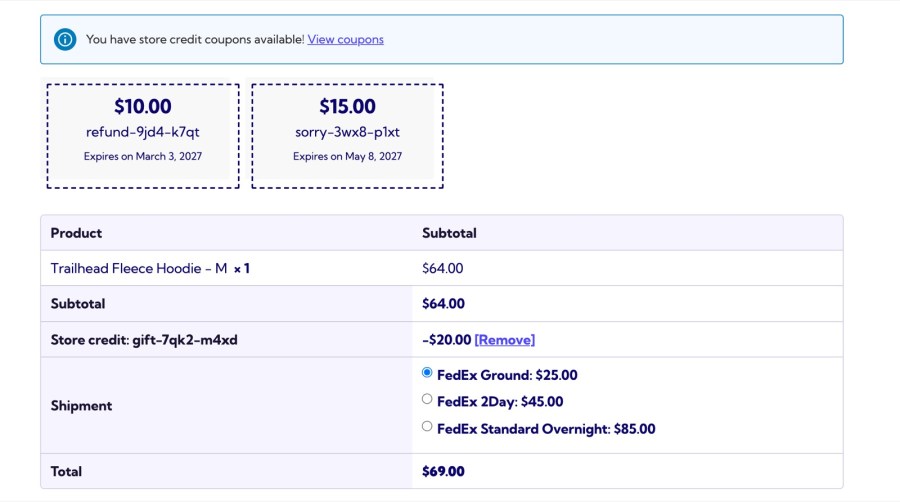
Logged-in customers see their available credit in the cart and at checkout, with the credit that expires soonest listed first, and apply it with one click. It works on the classic pages and the Cart and Checkout blocks, including checkouts without a coupon field, such as CheckoutWC. Credit combines with other coupons, and customers pay any difference with your usual payment methods, so a $50 balance never blocks a $70 order, and nobody has to find a code in an old email.
  • Apply credit with one click instead of copying a code
  • Combine several store credit coupons with your other coupons
  • Show each coupon’s expiry and any product or category restriction
Store credit coupons listed at checkout with amount, code and expiry
Customers apply their credit at checkout in one click

Spend one balance across many orders

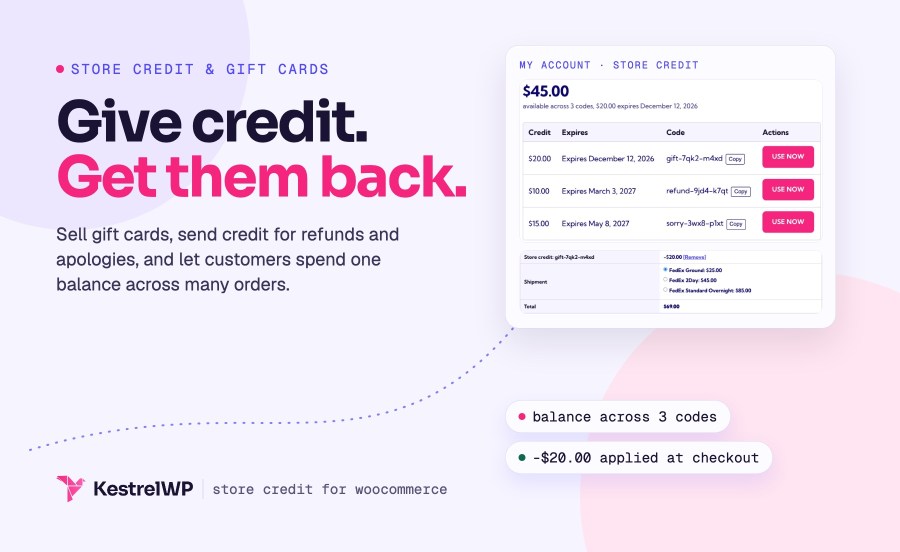
A customer with $50 of credit places a $30 order. The credit covers it, and $20 stays on the coupon for next time. A Store credit page in My Account shows their total balance, how many codes they hold and the next expiry, then lists each code with its expiry, a Copy button and a Use now button that opens your store with the credit applied. Used and expired credit hides itself, so the list shows only what they can spend.
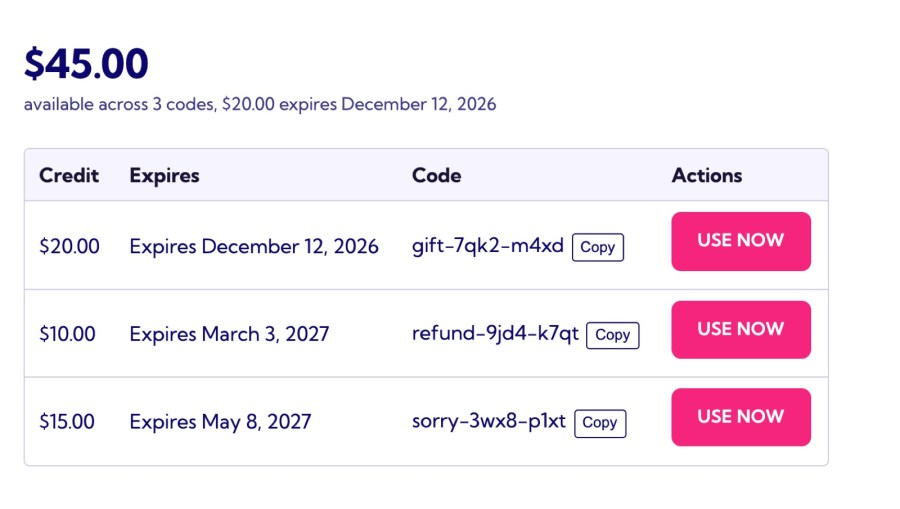
  • Show the total balance on the My Account dashboard
  • List every code with its expiry, a Copy button and Use now
  • Hide used and expired credit so customers see only what they can spend
My Account store credit page listing codes with credit amount, expiry date and a Use now button
My Account shows the total balance and every code

Get credit back when an order is cancelled or refunded

Credit leaves the balance when an order is placed and comes back when the order is cancelled or refunded, so customers aren’t out of pocket when something goes wrong. Each coupon shows the orders that used it and how much was spent, every order carries a Store credit used line, and the WooCommerce REST API includes the amount for your accounting tools. Staff can apply or remove credit on a Pending payment or On hold order from the order screen.
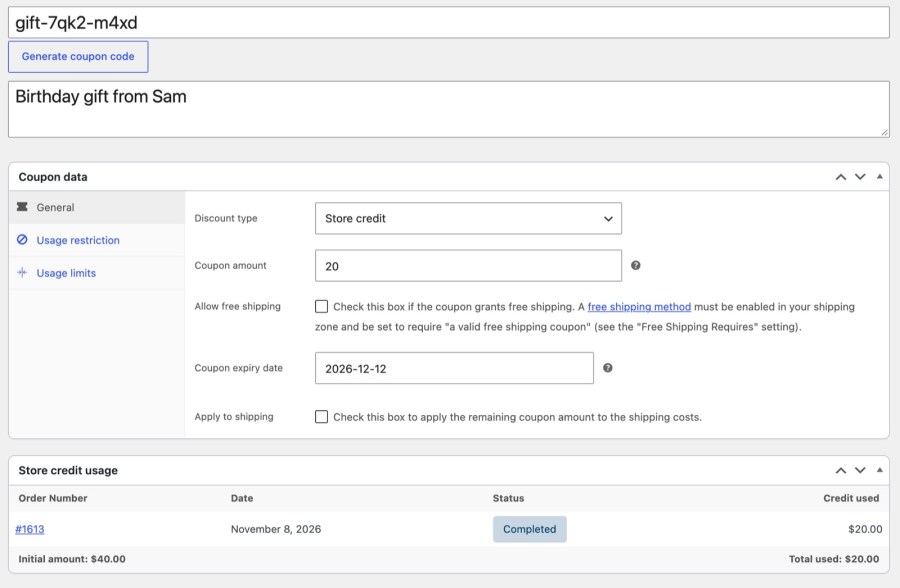
  • Restore credit automatically when an order is cancelled or fully refunded
  • See every order that used a coupon, with the total spent
  • Apply or remove credit on unpaid orders from the order screen
Store credit coupon with remaining balance and a table of the orders that used it
Each coupon shows what is left and the orders that used it

Decide exactly where credit applies

Set the rules once under WooCommerce » Settings » Store credit, and every new coupon follows them. Let leftover credit pay for shipping, and enter amounts with tax included when your store enters prices with tax and rounds tax at the subtotal. Limit credit to products or categories, and it discounts only the matching items. A coupon that’s used up is deleted (moved to the trash) on its own when Delete after use is on, and a later refund restores it. Changing a setting only affects new coupons, so credit you already sent keeps the terms the customer was given.
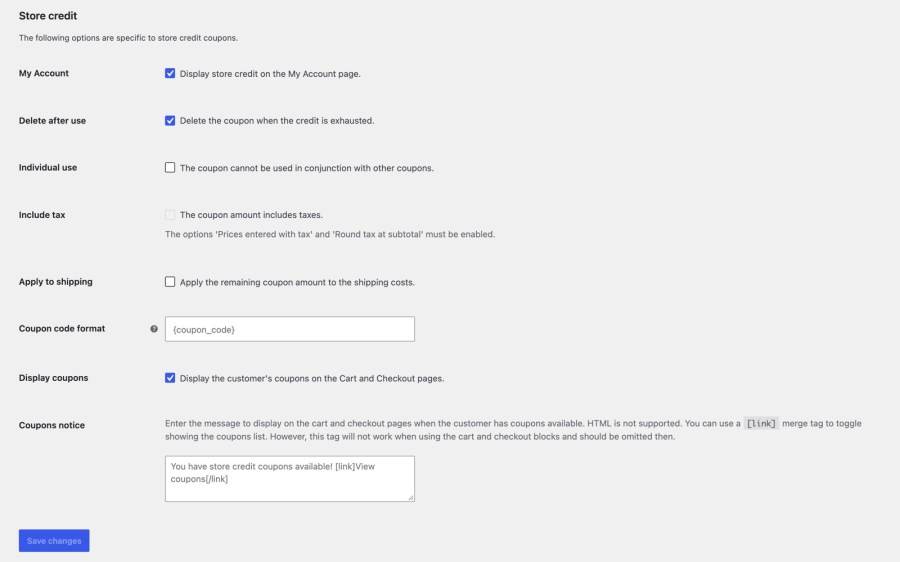
  • Let remaining credit discount shipping, or keep it to products
  • Enter credit with tax included when your store enters prices with tax
  • Exclude sale items, or limit credit to chosen products and categories
  • Delete a coupon automatically once its credit is used up, with Delete after use
Store credit settings for shipping, tax and deleting used-up coupons
Set shipping, tax and clean-up rules once for every coupon

Store credit or Account Funds?

Both give customers a balance to spend in your store. Store Credit hands out credit as coupons; Account Funds for WooCommerce keeps a wallet for every customer that pays at checkout like a payment method.

Store Credit (this extension)

  • Credit is a coupon with a balance, tied to the customer’s email
  • Customers apply it like a coupon at cart and checkout, from a one-click list
  • Buyers send gift cards to another email address with a message
  • Guests can receive and spend credit sent to their email
  • You send credit instead of a cash refund, whenever you choose
  • Covers first orders and manual subscription renewals

Account Funds

  • Credit is a wallet balance on the customer’s account
  • Customers pay with a Store credit payment method, for all or part of an order
  • Automatic cashback, sign-up and review rewards credit the wallet
  • A Refund via store credit button sits on the order screen
  • Pays automatic subscription renewals from the wallet
  • Best for loyalty cashback, prepaid wallets and subscriptions

Works well with

Store Credit works on its own. If you also want cashback that credits customers automatically, prepaid wallets, or subscription renewals paid from a balance, look at Account Funds for WooCommerce, which keeps a wallet for each customer.

With WooCommerce Subscriptions, credit discounts first orders and manual renewals. Store Credit also works with Avalara AvaTax, PDF Invoices & Packing Slips, WooCommerce Shipping & Tax and WooCommerce Deposits. Read the Store Credit documentation for every setting.

Get started

  1. Add Store Credit to your store, then install and activate it
  2. Turn on coupons under WooCommerce » Settings » General
  3. Review the options under WooCommerce » Settings » Store credit
  4. Send your first credit from WooCommerce » Send store credit
  5. Or add a Store credit product to sell gift cards

Built and supported by Kestrel, a long-time WooCommerce extension developer.

KestrelWP

Frequently asked questions

Should I choose Store Credit or Account Funds?

Choose Store Credit for gift cards, goodwill credit and refunds kept in store: credit is a coupon tied to an email. Choose Account Funds for WooCommerce for automatic cashback, wallets customers top up, and automatic subscription renewals paid from a balance. The comparison above sets them side by side.

Can I sell gift cards in WooCommerce?

Yes. Add a Store credit product with preset amounts, or let customers choose an amount between a minimum and maximum you set. The buyer can send the credit to another email address with a personal message, and the recipient gets a code by email.

Can I send credit to several customers at once?

Yes, but they share one code and one balance, so credit one customer spends is gone for the others. To give each customer their own credit, send it to one customer at a time.

Can guests use store credit?

Yes. Send credit to any email address, and the guest enters the code in the coupon field. At checkout, WooCommerce checks that the billing email matches the address the credit was sent to.

Can customers pay automatic subscription renewals with credit?

No. With WooCommerce Subscriptions, credit discounts first orders and manual renewals, but it isn't a payment method, so it can't pay automatic renewals. For renewals paid from a balance, use Account Funds.

Does it work with the Cart and Checkout blocks, CheckoutWC and HPOS?

Yes. Store Credit supports the Cart and Checkout blocks and High-Performance Order Storage. On checkouts without a coupon field, such as CheckoutWC, customers apply credit from the list of their available coupons.

Extension information

  • WordPress version required: 4.9
  • WooCommerce version required: 3.7.0
  • PHP version required: 7.4
  • Tested with WordPress: 7.1.4
  • Tested with WooCommerce: 11.3.0
  • Requires at least WordPress: 6.0
  • Requires at least WooCommerce: 8.2

Countries

  •  Worldwide

Customer reviews

Average rating 3.4

14 reviews from verified users

5 stars, 36% of reviews
4 stars, 21% of reviews
3 stars, 14% of reviews
2 stars, 0% of reviews
1 star, 29% of reviews

Click to rate

  • Rated 3 out of 5
    tppc0202AustraliaMay 11, 2026
    It’s okay to have this option rather than refunding the order, however a few key information lines are missing. There is also no status showing whether the customer has received or used the store credit, which makes it difficult to track properly.
  • Rated 1 out of 5
    RaydeltaUnited Kingdom (UK)Jul 22, 2025
    Worked well up until about 4 months ago with the latest woocommerce and wordpress updates there is an intermittent bug where it will discount MUCH MORE than the "Store Credit" is set to. When this bug happens it logs no errors, so hope you have honest customers.... So for example this morning a store credit was set to £5. And it discounted the customers entire basket (£840). I have immediately uninstalled the plugin, luckily my customer was honest.
  • Rated 3 out of 5
    wisdomoftheearthaudreUnited States (US)Mar 21, 2025
    This plugin works well for applying store credits. However, it makes management of non-store credit coupons more difficult, as the store credit is a type of coupon, which pollutes your list of coupons. I'd give this five stars if they modified the default coupon listing to exclude store credits, and provided another listing for just store credits, or an easy way to toggle between the two. Even better would be to not use the coupon mechanism entirely, since writing programs to operate over coupons requires additional care with the approach they took.
  • Rated 1 out of 5
    Brett HenrichsenUnited States (US)Feb 9, 2025
    Piece of junk plugin that consistently slows down any site we put it on. Loading orders in WooCommerce, updating products, and even just general WordPress Admin slows to a CRAWL with this plugin installed. Deactivate it, and everything goes back to normal. Consistently. Every time we try it, on any site. We've even carefully deactivated EVERYTHING but it, problem persists, deactivate Store Credit, and it's back to you normal.
  • Rated 5 out of 5
    befitwithtaniaUnited States (US)Jan 27, 2025
    I absolutely love the functionality of Woo Commerce Store Credit! I run an online fitness program; the credit my customer’s purchase goes on their account which allows them the ability to sign up and pay for multiple classes throughout the month at a discounted rate. I have never, not even once, had a problem with the functionally of this plug in! THANK YOU! When setting up my website, Store Credit was the most important element to make my site function the way I needed it to.

Related Products

Price $199 annually
Rated 4 out of 5 stars
Price $279 annually
Rated 3.9 out of 5 stars
Price $119 annually
Rated 3.5 out of 5 stars
Price $79 annually
Rated 4.2 out of 5 stars
Price $109 annually
Rated 4.6 out of 5 stars
Price $79 annually
Rated 4 out of 5 stars
Price $29 annually
Rated 3.7 out of 5 stars
Price $49 annually
Rated 3.9 out of 5 stars
Price $49 annually
Rated 2.7 out of 5 stars
Use of your personal data
We and our partners process your personal data (such as browsing data, IP Addresses, cookie information, and other unique identifiers) based on your consent and/or our legitimate interest to optimize our website, marketing activities, and your user experience.